Computer Graphics: Colors
Colors
- This report explains the fundamental concepts of how digital colors are handled in computer graphics, focusing on the sRGB color space and gamma correction.
sRGB
Color Channel and Bit Depth
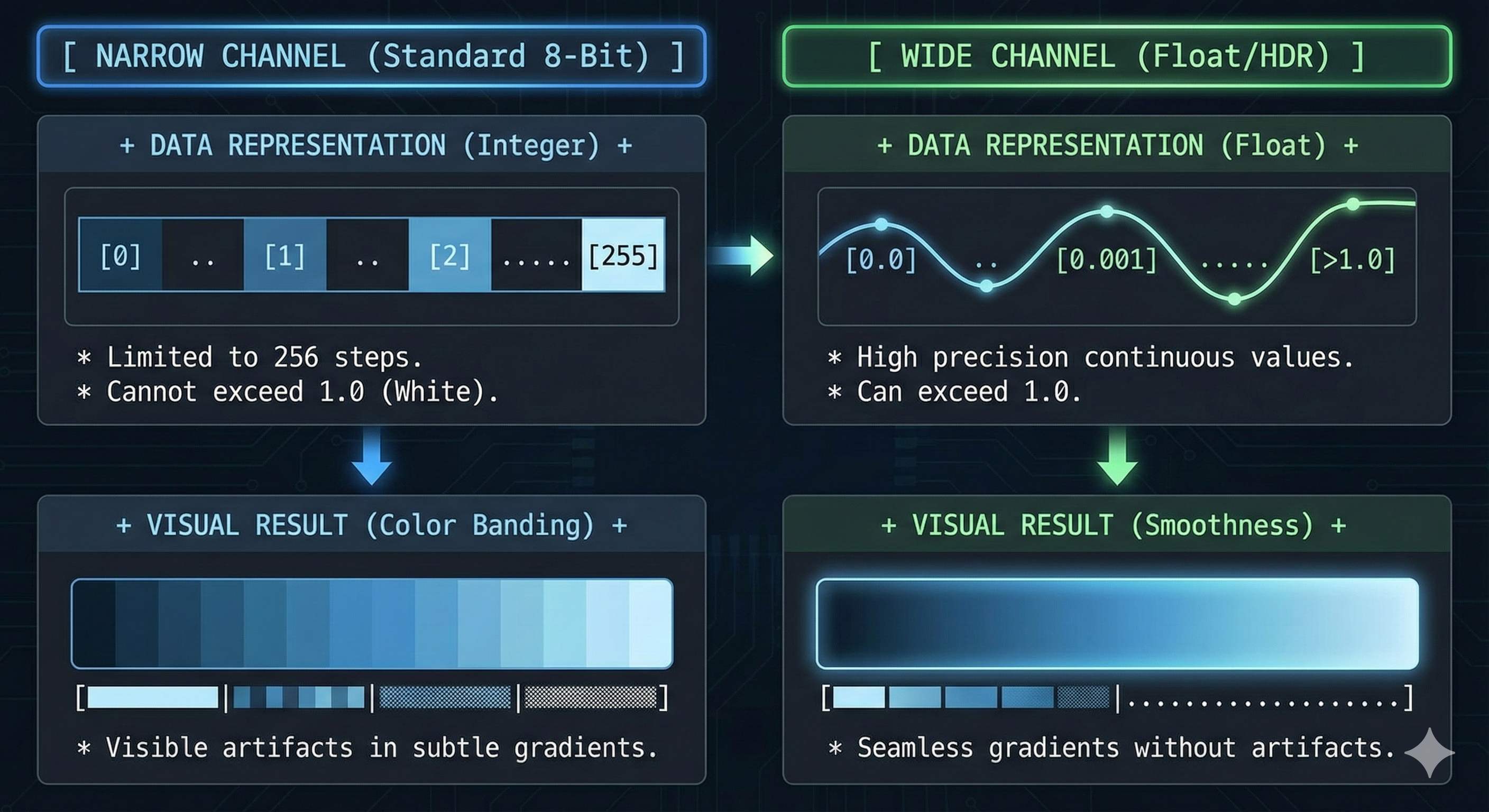
- A standard color channel (Red, Green, or Blue) typically uses 8 bits, representing 256 distinct intensity levels ($2^8$).
- In an RGB system, this combines to create approximately 16.7 million unique colors ($256^3$).
- However, 8-bit precision can lead to visual artifacts like color banding in smooth gradients.
- To address this, modern graphics pipelines “widen the channel” by utilizing 16-bit (Half) or 32-bit (Float) precision.
-
This increased bit depth is essential for High Dynamic Range (HDR) rendering, enabling the storage of light values greater than 1.0 and ensuring mathematically precise lighting calculations without data loss.
Linear and Gamma Space
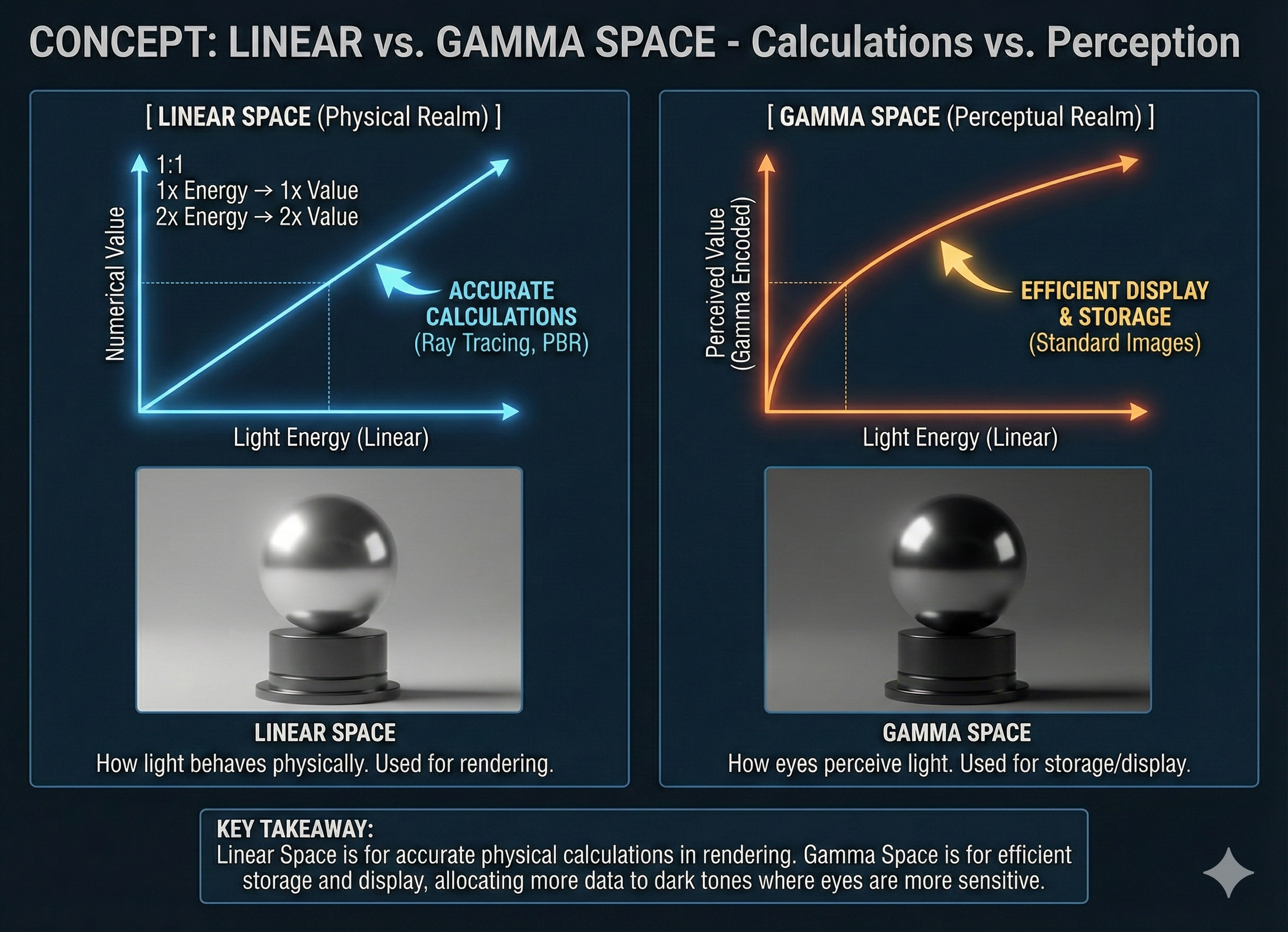
- Linear space is the “physical” realm.
- It’s how light truly behaves and is measured in the real world.
- In this space, if one light source has twice the energy of another, its numerical value is exactly double.
- This is the space where all physically-based rendering calculations, such as those in ray tracing, should be performed to ensure accuracy.
- Gamma space, on the other hand, is the “perceptual” realm.
- It’s a non-linear color space that’s designed to mimic how our eyes perceive light.
- Since our eyes are more sensitive to changes in dark tones than in bright ones, gamma space allocates more of its data to the darker end of the spectrum.
- This is why a digital file using gamma space (like a standard 8-bit image) can look so good.
- it’s efficiently using the limited data to represent the colors that matter most to our vision.
- To summarize:
- Linear space is for accurate calculations.
- Gamma space is for efficient display and storage.
What is sRGB?
- sRGB (standard Red Green Blue) is the most common color space standard for digital content like photos, web graphics, and computer monitors.
- It’s essentially a specific type of gamma space that’s been widely adopted.
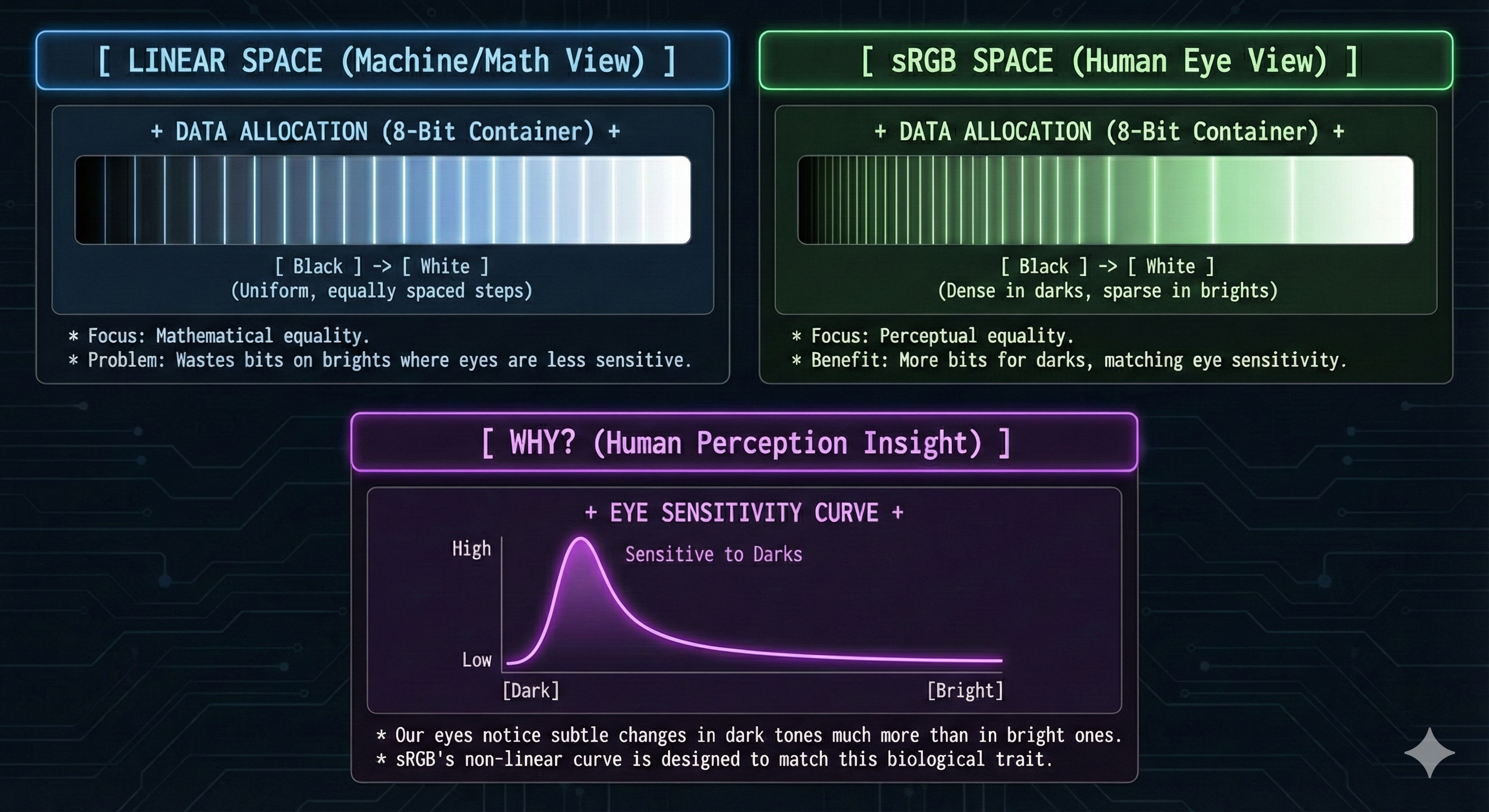
- The sRGB format aids in texture compression by encoding color information in a non-linear way that more closely matches human perception.
- This is because our visual system is more sensitive to changes in darker tones.
- By allocating more bits to represent these darker shades,
- sRGB ensures that the limited 8-bit color space is utilized more efficiently from a perceptual standpoint, reducing visible banding and improving compression quality.
Is RGB(0.5, 0.5, 0.5) mid-gray?
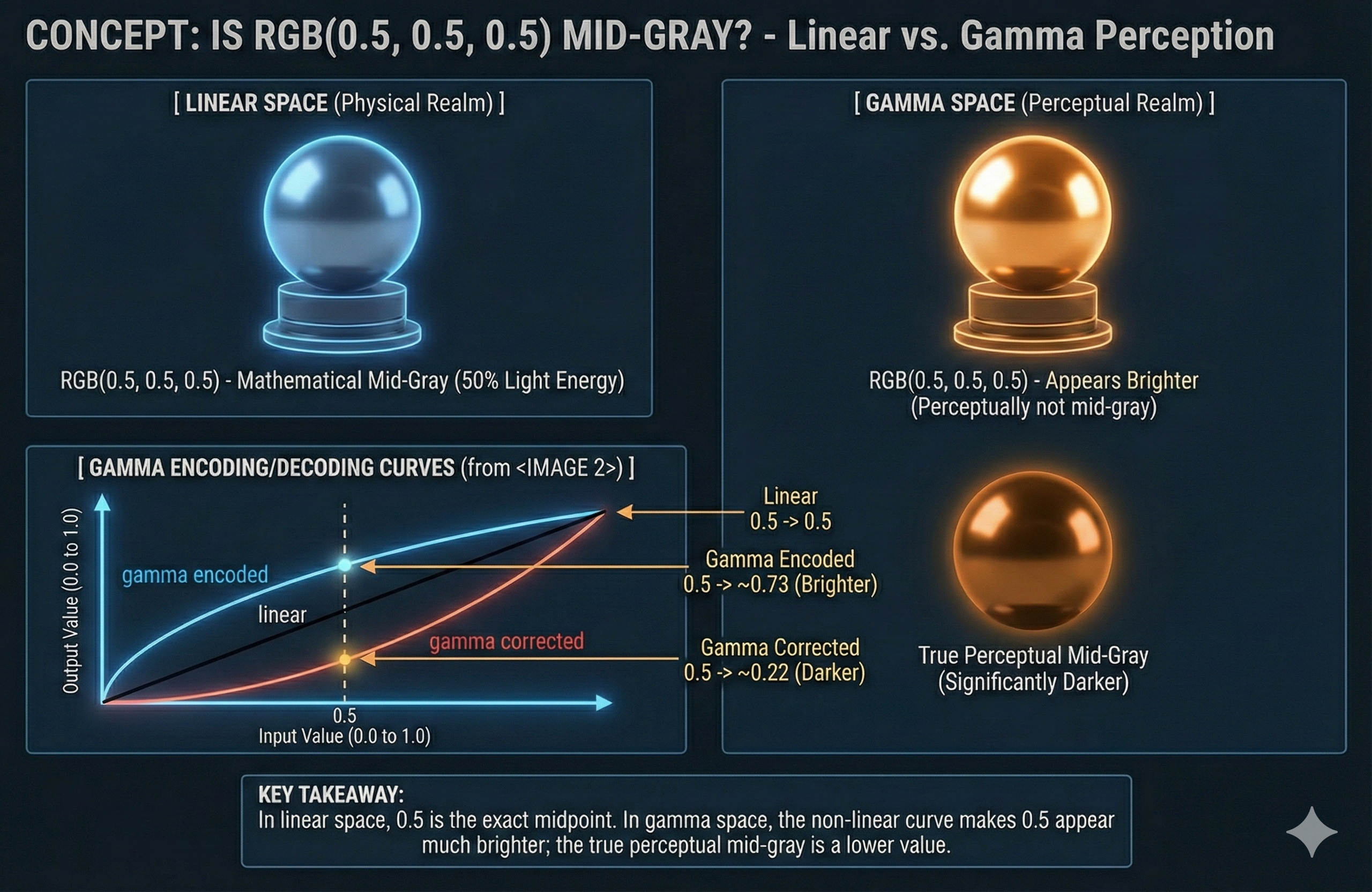
- In a linear color space, RGB(0.5, 0.5, 0.5) mathematically represents a mid-gray.
- However, in a gamma-encoded color space, this value appears much brighter than a true perceptual mid-gray.
- The true mid-gray in a gamma space is significantly darker because of the non-linear curve.
-
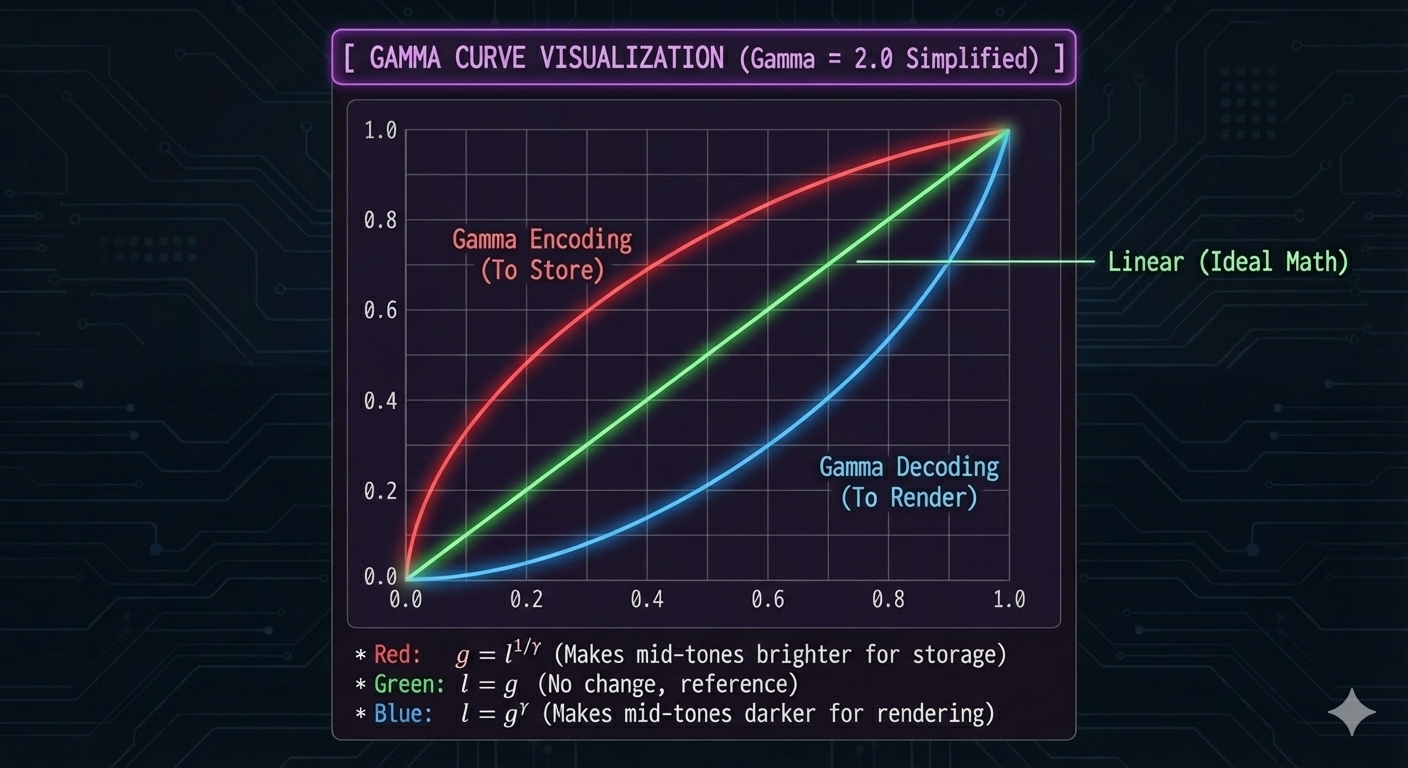
The relationship between linear and gamma-corrected values is illustrated by the following graphical representation of the gamma encoding and decoding curves.
18% gray
- 18% gray is a specific shade of neutral gray that reflects 18% of the incident light.
- This specific reflectivity makes it a key reference point in photography and cinematography for exposure metering.
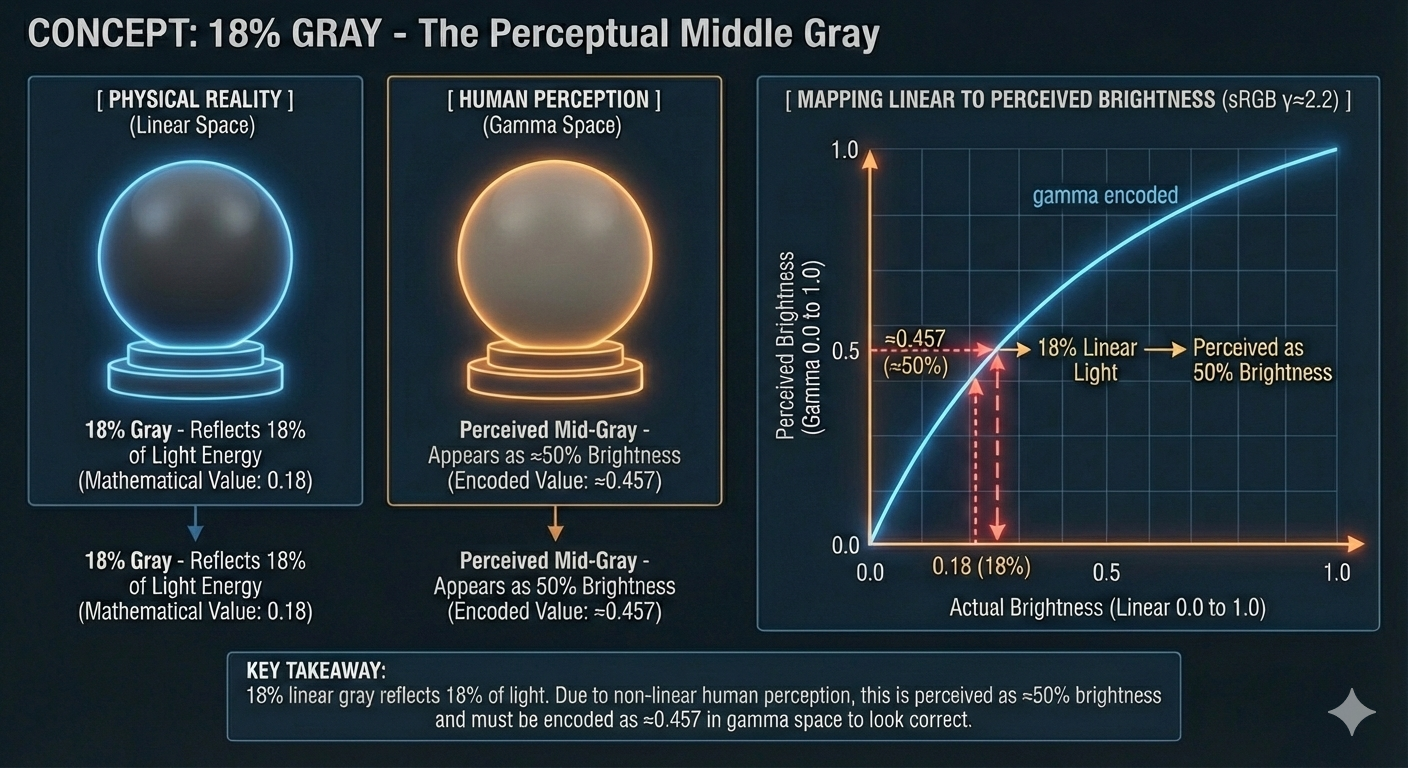
- A common misconception is that 18% gray corresponds to a digital intensity value of 0.18 (out of 1.0) in a gamma-encoded space, such as sRGB.
- As illustrated in Figure 1, the non-linear nature of human perception causes 18% linear light to be perceived as 50% brightness (perceptual mid-gray).
- Due to this non-linear transfer function, an 18% linear gray value must be encoded to a digital value of approximately 0.457 ($0.18^{1/2.2}$) to appear as a perceptually mid-gray on a standard monitor.
-
Figure 1: The Perceptual Mid-Gray Mapping.
Gamma Correction
Transfer Function (Gamma Correction)
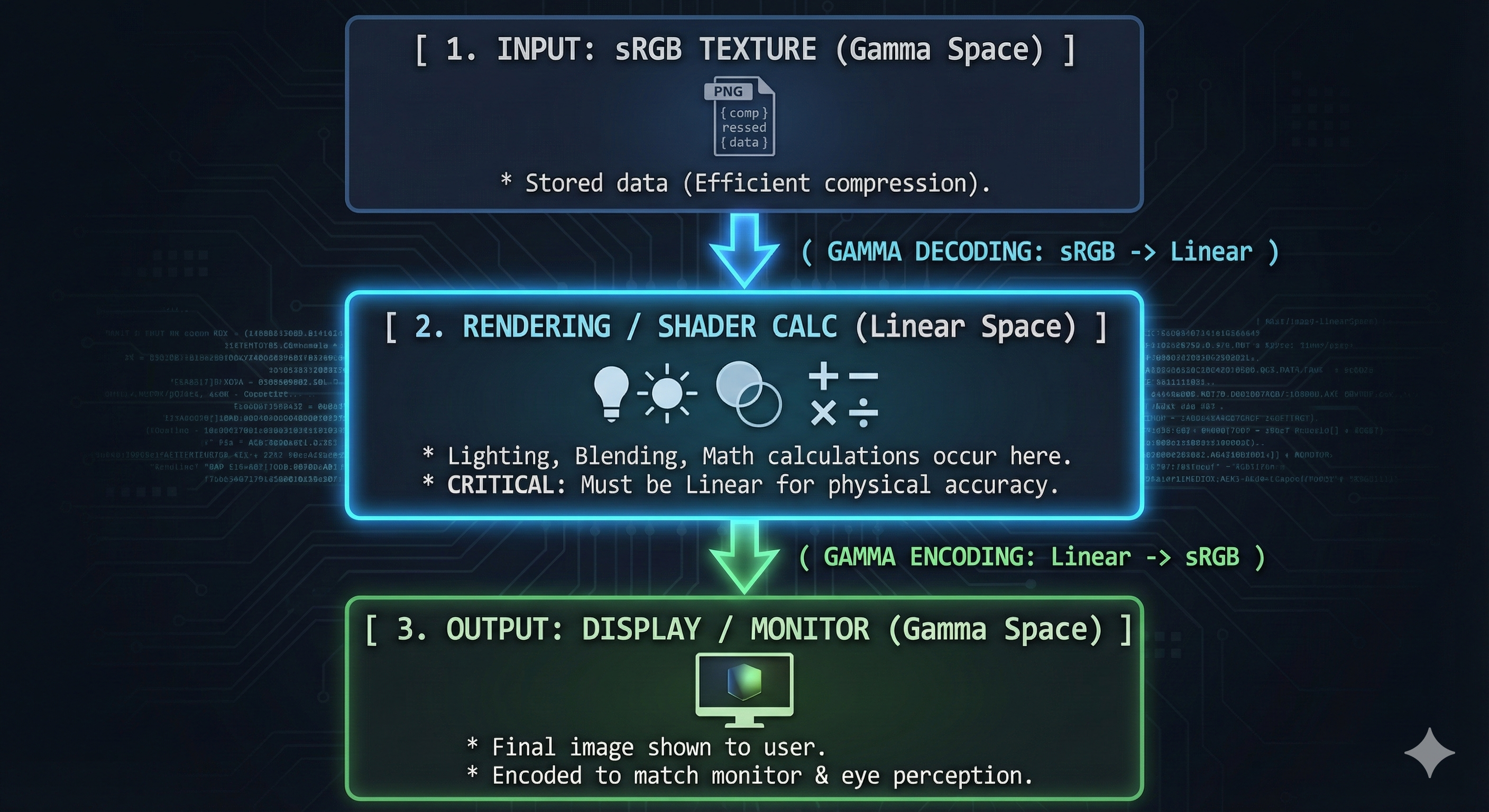
- A transfer function, specifically gamma encoding, is applied to linear light values to bridge the gap between linear space and gamma space.
- This non-linear operation extends the dark tones and compresses the bright tones to make them more perceptually uniform for our eyes.
- The reverse process, gamma decoding, is crucial for rendering calculations.
- This is because all physical light interactions (e.g., combining colors, shadows) must occur in linear space to be physically accurate.
-
Failure to properly manage this transfer function can lead to an image that is significantly darker or has an incorrect tonal balance.
How to apply gamma correction?
- A common simplification uses a gamma value of 2 to illustrate the conversion between linear and gamma spaces.
- To convert a gamma-encoded value $g$ to a linear value $l$:
- $l = g^\gamma$
- For a gamma of 2, this becomes:
- $l = g^2$.
- To convert a linear value $l$ back to a gamma-encoded value $g$:
- $g = l^{1/\gamma}$
- For a gamma of 2, this becomes:
- $g = \sqrt{l}$.
- To convert a gamma-encoded value $g$ to a linear value $l$:
Should normal and roughness textures be gamma-corrected?
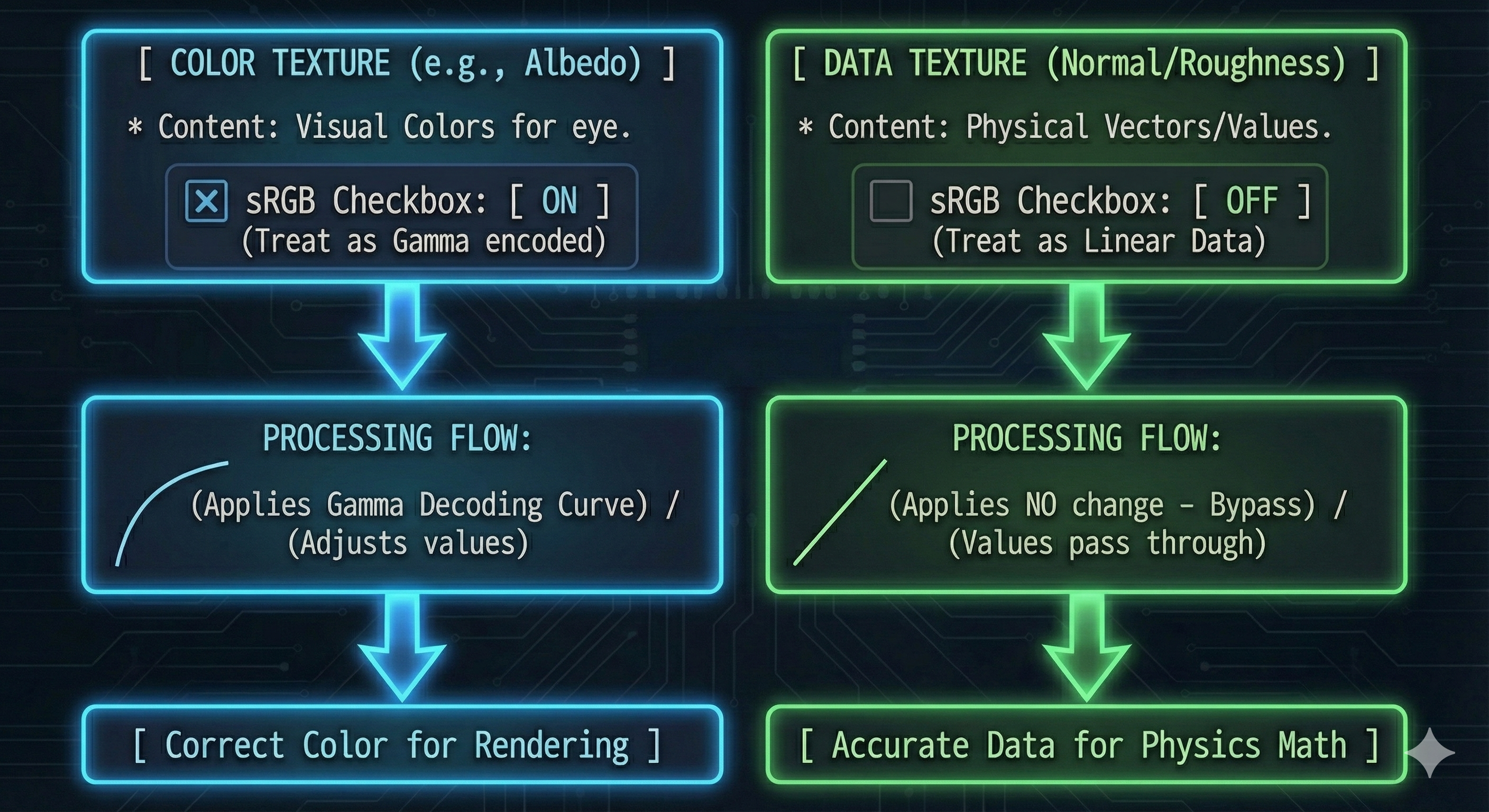
- No, normal and roughness textures should not be gamma-corrected.
- These textures store data that represents physical properties of a surface (e.g., direction of a normal, surface roughness), not color.
- This data must remain linear for physically based rendering calculations to be correct.
Color Transformation in Real-Time Rendering
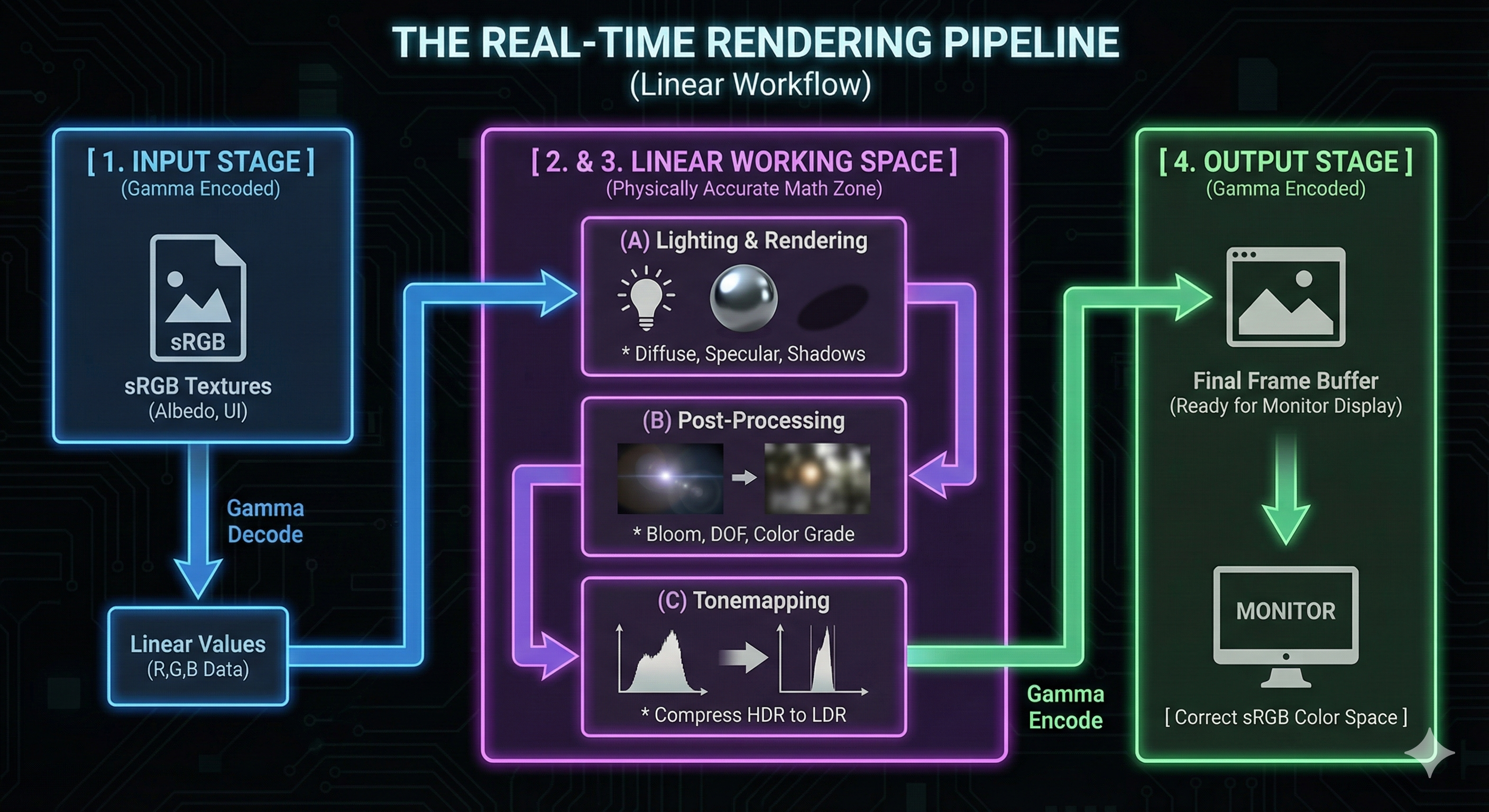
- The process of simulating light and color in a game engine involves a series of transformations to accurately represent how light behaves in the physical world.
- This ensures that lighting, shading, and post-processing effects are calculated on correct light intensity values before being displayed on a monitor.
- The following stages outline this pipeline.
- Input Textures (Gamma to Linear):
- Textures created by artists are typically saved in the sRGB format (gamma-encoded).
- For a game engine to perform physically accurate lighting calculations,
- it must first convert these sRGB textures from gamma space to linear space.
- This ensures that lighting equations for diffuse reflection, specular highlights, and shadows are performed on the actual light intensity values.
- Lighting & Rendering (Linear):
- All the heavy lifting of calculating how light bounces around the 3D scene, how shadows are cast, and how materials react to light happens entirely in linear space.
- This is crucial for achieving physically accurate and realistic rendering.
- Post-Processing & Tonemapping (Linear):
- Following the initial lighting calculations, many post-processing effects like bloom, depth of field, and color grading are applied in linear space.
- Tonemapping is a vital step here, which compresses the wide dynamic range of linear light values into a range that can be displayed on a typical monitor.
- Output to Display (Linear to Gamma):
- The final rendered image must be converted back from linear space to gamma space (sRGB) before it is sent to the display.
- This final gamma correction step ensures that the monitor receives data it can correctly interpret, presenting a perceptually balanced image to the user.
- Input Textures (Gamma to Linear):
Why do images look darker without gamma correction?
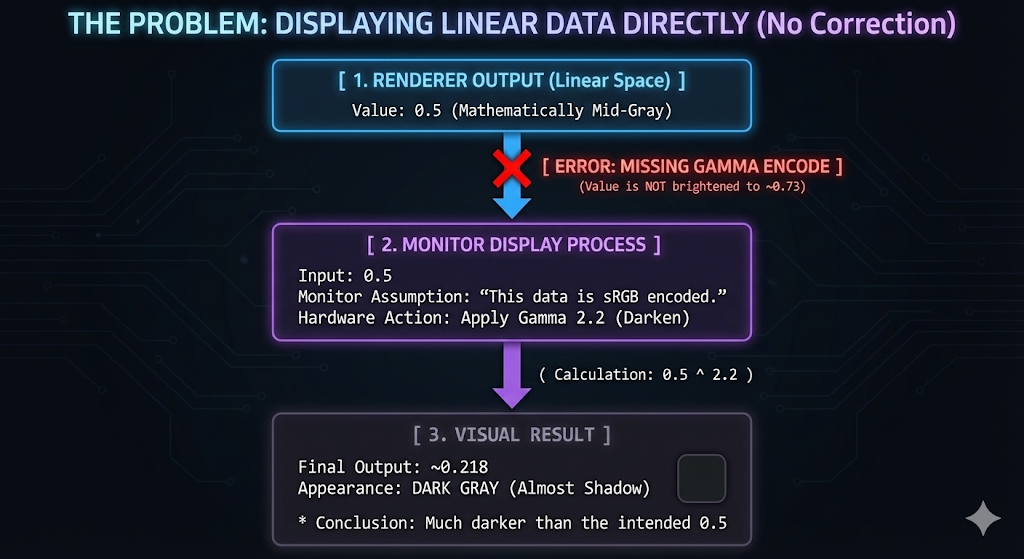
- When gamma correction is not applied
- the display will apply its own gamma curve to the data, expecting it to be in gamma space.
- Since the input value is already linear, the display’s gamma curve effectively applies a power function to a value that is already correct.
- This causes the image to appear significantly darker than intended.
-
For example, a linear mid-gray of 0.5 will be treated by the display as a gamma value and will be displayed as $0.5^{2.2} \approx 0.22$, which is perceptually very dark.
Leave a comment